mirror of
https://github.com/nextcloud/vm.git
synced 2025-10-26 11:27:32 +00:00

162 lines
7.3 KiB
Markdown
162 lines
7.3 KiB
Markdown
# Nextcloud VM
|
|
**Downloads from Github:**
|
|

|
|
<br>
|
|
**Join our IRC channel:**
|
|
[](https://webchat.freenode.net/?channels=techandme)
|
|
<br>
|
|
**Build Status:**
|
|
[](https://travis-ci.org/nextcloud/vm)
|
|

|
|
## Support the development
|
|
* [Create a PR](https://help.github.com/articles/creating-a-pull-request/) and improve the code
|
|
* Report [your issue](https://github.com/nextcloud/vm/issues/new)
|
|
* Help us with [existing issues](https://github.com/nextcloud/vm/issues)
|
|
* Write scripts so that this can be installed with [Vagrant](https://www.vagrantup.com/docs/getting-started/) or similar
|
|
* [Donate](https://shop.techandme.se/index.php/product-category/donate/) or buy our [pre-configured VMs](https://shop.techandme.se/index.php/product-category/virtual-machine/): 500 GB, 1 TB, PostgreSQL or Hyper-V.
|
|
|
|
## Current [maintainers](https://github.com/nextcloud/vm/graphs/contributors)
|
|
* [Daniel Hanson](https://github.com/enoch85) @ [Tech and Me](https://www.techandme.se)
|
|
* You? :)
|
|
|
|
## Special thanks to
|
|
* [Ezra Holm](https://github.com/ezraholm50) @ [Tech and Me](https://www.techandme.se)
|
|
* [Luis Guzman](https://github.com/Ark74) @ [SwITNet](https://switnet.net)
|
|
* [Stefan Heitmüller](https://github.com/morph027) @ [morph027's Blog](https://morph027.gitlab.io/)
|
|
* [Lorenzo Faleschini](https://github.com/penzoiders)
|
|
|
|
## Build your own VM, or install on a VPS
|
|
DigitalOcean example: https://youtu.be/LlqY5Y6P9Oc
|
|
|
|
#### Minimum requirements:
|
|
* A clean Ubuntu Server 18.04.X
|
|
* OpenSSH (preferred)
|
|
* 20 GB HDD for OS
|
|
* XX GB HDD for DATA (/mnt/ncdata)
|
|
* At least 1 vCPU and 2 GB RAM (4 GB minimum if you are running OnlyOffice)
|
|
* A working internet connection (the script needs it to download files and variables)
|
|
|
|
#### Recommended
|
|
* Thick provisioned (better performance and easier to maintain)
|
|
* DHCP available
|
|
* 40 GB HDD for OS
|
|
* 4 vCPU
|
|
* 4 GB RAM
|
|
|
|
#### Installation
|
|
1. Get the latest install script from master:<br>
|
|
`wget https://raw.githubusercontent.com/nextcloud/vm/master/nextcloud_install_production.sh`
|
|
2. Run the script with:<br>
|
|
`sudo bash nextcloud_install_production.sh`
|
|
3. When the VM is installed it will automatically reboot. Remember to login with the user you created:<br>
|
|
`ssh <user>@IP-ADDRESS`<br>
|
|
If it automatically runs as root when you reboot the machine, you have to abort it by pressing `CTRL+C` and run the script as the user you just created:<br>
|
|
`sudo -u <user> sudo bash /var/scripts/nextcloud-startup-script.sh` <br>
|
|
4. Please note that the installation/setup is *not* finnished by just running the `nextcloud_install_production.sh` When you login with the (new) sudo user you ran the script with in step 2 you will automatically be presented with the setup script.
|
|
|
|
## Machine configuration of the released version
|
|
Please check the configuration here: https://www.techandme.se/machine-setup-nextcloud/
|
|
|
|
## Do you want to run this on your Raspberry Pi?
|
|
Great news! We have forked this repository and created a Raspberry Pi image that you can download from here:
|
|
https://github.com/techandme/NextBerry or here https://www.techandme.se/nextberry-rpi/.
|
|
|
|
We call it NextBerry and it's confirmed to be working on Raspberry Pi 2 & 3.
|
|
|
|
## I want to test RC!
|
|
No problem! We made it simple. Run `update.sh` but abort it before it starts so that you have the latest `nextcloud_update.sh`. Then put this in your `nextcloud_update.sh` below the curl command (lib.sh) but before everything else and run it:
|
|
|
|
To test a specific RC version:
|
|
|
|
```
|
|
NCREPO="https://download.nextcloud.com/server/prereleases"
|
|
NCVERSION=12.0.1RC5
|
|
STABLEVERSION="nextcloud-$NCVERSION"
|
|
```
|
|
|
|
Or the latest RC:
|
|
```
|
|
NCREPO="https://download.nextcloud.com/server/prereleases"
|
|
NCVERSION=$(curl -s -m 900 $NCREPO/ | sed --silent 's/.*href="nextcloud-\([^"]\+\).zip.asc".*/\1/p' | sort --version-sort | tail -1)
|
|
STABLEVERSION="nextcloud-$NCVERSION"
|
|
```
|
|
|
|
## FAQ
|
|
|
|
Keep asking questions so that we can add them here.
|
|
|
|
**Q: Where can i dowload VMware Player?**
|
|
<br />
|
|
**A:** You can download the latest release [here](https://my.vmware.com/web/vmware/free#desktop_end_user_computing/vmware_workstation_player/12_0).
|
|
|
|
**Q: The downloaded file is just a few kilobyte, or corrupted**
|
|
<br />
|
|
**A:** This is due to heavy load on the server. Please try again in a few minutes.
|
|
|
|
**Q: The script says: "WARNING: apt does not have a stable CLI interface yet. Use with caution in scripts"**
|
|
<br />
|
|
**A:** http://askubuntu.com/a/463966
|
|
|
|
**Q: I get NETWORK NOT OK when booting the VM. How do I solve that?**
|
|
<br />
|
|
**A:** There are a few causes to this error, most of them are your own network or firewall settings.
|
|
<br />
|
|
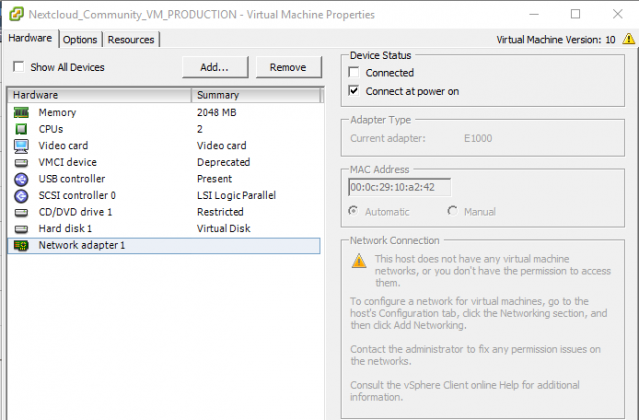
- Remove the VM NIC adapter in settings on VMware/Virtualbox and then re-adding a NIC adapter.
|
|
|
|
- Check your firewall so that it doesn't block this specific IP
|
|
- Check your router/firewall that you have DHCP enabled.
|
|
|
|
**Q: I get a message that I'm not root, but I am.**
|
|
<br />
|
|
**A:** Please see here: https://github.com/nextcloud/vm/issues/200
|
|
|
|
**Q: Which Hyper-V generation should we chose when creating a machine to load this image?**
|
|
<br />
|
|
**A:** You currently need to use a 1st generation machine.
|
|
|
|
**Q: Do you have a pre-configured Hyper-V VM?**
|
|
<br />
|
|
**A:** Yes we have, you can download it here: https://shop.techandme.se/index.php/product/nextcloud-vm-microsoft-hyper-v-vhd/
|
|
|
|
**Q: I want a bigger version of this VM, where can I find that?**
|
|
<br />
|
|
**A:** You can download it here: https://shop.techandme.se/index.php/product/nextcloud-vm-500gb/
|
|
|
|
**Q: I have found a bug that I want to report, where do I do that?**
|
|
<br />
|
|
**A:** Just submit your report here: https://github.com/nextcloud/vm/issues/new
|
|
|
|
**Q: How to update Nextcloud VM?**
|
|
<br />
|
|
**A:** You can not use the built in updater in Nextcloud GUI due to secure permissions on this VM. Use the built in script instead:
|
|
`sudo bash /var/scripts/update.sh`
|
|
|
|
**Q: How to install apps if not selected during first install?**
|
|
<br />
|
|
**A:** Go to the apps folder in this repo and download the script in raw format and run them. For installing Talk:
|
|
`wget https://raw.githubusercontent.com/nextcloud/vm/master/apps/talk.sh && sudo bash talk.sh`
|
|
|
|
**Q: How to continue from partially installed system? - You got the FQDN wrong/You put in a bad password/ etc...**
|
|
<br />
|
|
**A:** Extract the VM again and start over. The script can *not* be run twice in a row.
|
|
|
|
**Q: Does automatic update update Ubuntu and Nextcloud?**
|
|
<br />
|
|
**A:** if you want automatic updates of both Ubuntu and Nextcloud then check out this blog post: https://www.techandme.se/nextcloud-update-is-now-fully-automated/
|
|
|
|
**Q: Can I enable-disable automatic update later of OS/Nextcloud?**
|
|
<br />
|
|
**A:** Yes, it's controlled by a cronjob. Just disable the cronjob to disable automatic updates.
|
|
|
|
**Q: How to backup?**
|
|
<br />
|
|
**A:** There are several ways. We recomend Rsync to a NAS or similar. You can find a script here: https://www.techandme.se/rsync-backup-script/
|
|
|
|
**Q: Can I install in a VM with a NAT and port redirection of port 443 & 10000 & 22?**
|
|
<br />
|
|
**A:** Yes, check this out: https://www.techandme.se/publish-your-server-online/
|
|
|
|
## First look
|
|
|
|

|