# Nextcloud VM
[](https://webchat.freenode.net/?channels=techandme) [](https://travis-ci.org/nextcloud/vm) [](http://github.com/badges/stability-badges)
## Support the development
* [Create a PR](https://help.github.com/articles/creating-a-pull-request/) and improve the code
* Report [your issue](https://github.com/nextcloud/vm/issues/new)
* Help us with [existing issues](https://github.com/nextcloud/vm/issues)
* Write scripts so that this can be installed with [Vagrant](https://www.vagrantup.com/docs/getting-started/) or similar
* [Donate](https://shop.techandme.se/index.php/product-category/donate/) or buy our [pre-configured VMs](https://shop.techandme.se/index.php/product-category/virtual-machine/): 500 GB, 1 TB, PostgreSQL or Hyper-V.
## Current [maintainers](https://github.com/nextcloud/vm/graphs/contributors)
* [Daniel Hanson](https://github.com/enoch85) @ [Tech and Me](https://www.techandme.se)
* [Ezra Holm](https://github.com/ezraholm50) @ [Tech and Me](https://www.techandme.se)
* [Luis Guzman](https://github.com/Ark74) @ [SwITNet](https://switnet.net)
* [Stefan Heitmüller](https://github.com/morph027) @ [morph027's Blog](https://morph027.gitlab.io/)
* You? :)
## Build your own VM, or install on a VPS
DigitalOcean example: https://youtu.be/LlqY5Y6P9Oc
#### Minimum requirements:
* A clean Ubuntu Server 16.04.X
* OpenSSH (preferred)
* 20 GB HDD
* At least 1 vCPU and 2 GB RAM (4 GB minimum if you are running OnlyOffice)
* A working internet connection (the script needs it to download files and variables)
#### Recommended
* Thick provisioned (better performance and easier to maintain)
* DHCP available
#### Installation
1. Get the latest install script from master:
`wget https://raw.githubusercontent.com/nextcloud/vm/master/nextcloud_install_production.sh`
2. Run the script with:
`sudo bash nextcloud_install_production.sh`
3. When the VM is installed it will automatically reboot. Remember to login with the user you created:
`ssh @IP-ADDRESS`
If it automatically runs as root when you reboot the machine, you have to abort it by pressing `CTRL+C` and run the script as the user you just created:
`sudo -u sudo bash /var/scripts/nextcloud-startup-script.sh`
4. Please note that the installation/setup is *not* finnished by just running the `nextcloud_install_production.sh` When you login with the (new) sudo user you ran the script with in step 2 you will automatically be presented with the setup script.
## Machine configuration of the released version
Please check the configuration here: https://www.techandme.se/machine-setup-nextcloud/
## Do you want to run this on your Raspberry Pi?
Great news! We have forked this repository and created a Raspberry Pi image that you can download from here:
https://github.com/techandme/NextBerry or here https://www.techandme.se/nextberry-rpi/.
We call it NextBerry and it's confirmed to be working on Raspberry Pi 2 & 3.
## FAQ
Keep asking questions so that we can add them here.
**Q: Where can i dowload VMware Player?**
**A:** You can download the latest release [here](https://my.vmware.com/web/vmware/free#desktop_end_user_computing/vmware_workstation_player/12_0).
**Q: The script says: "WARNING: apt does not have a stable CLI interface yet. Use with caution in scripts"**
**A:** http://askubuntu.com/a/463966
**Q: I get NETWORK NOT OK when booting the VM. How do I solve that?**
**A:** There are a few causes to this error, most of them are your own network or firewall settings.
- Remove the VM NIC adapter in settings on VMware/Virtualbox and then re-adding a NIC adapter.
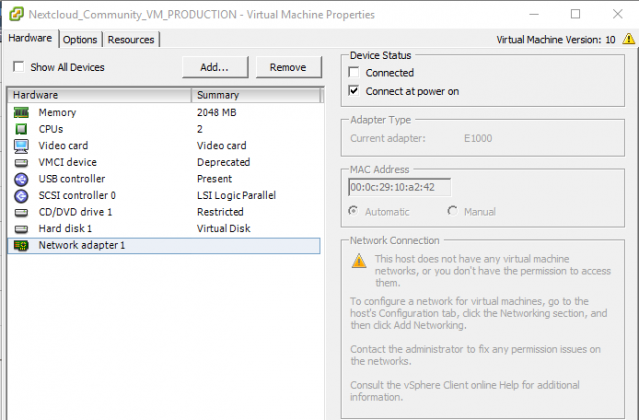
- Check your firewall so that it doesn't block this specific IP
- Check your router/firewall that you have DHCP enabled.
**Q: I get a message that I'm not root, but I am.**
**A:** Please see here: https://github.com/nextcloud/vm/issues/200
**Q: Which Hyper-V generation should we chose when creating a machine to load this image?**
**A:** You currently need to use a 1st generation machine.
**Q: Do you have a pre-configured Hyper-V VM?**
**A:** Yes we have, you can download it here: https://shop.techandme.se/index.php/product/nextcloud-vm-microsoft-hyper-v-vhd/
**Q: I want a bigger version of this VM, where can I find that?**
**A:** You can download it here: https://shop.techandme.se/index.php/product/nextcloud-vm-500gb/
**Q: I have found a bug that I want to report, where do I do that?**
**A:** Just submit your report here: https://github.com/nextcloud/vm/issues/new
**Q: How to update Nextcloud VM?**
**A:** You can not use the built in updater in Nextcloud GUI due to secure permissions on this VM. Use the built in script instead:
`sudo bash /var/scripts/update.sh`
**Q: How to install apps if not selected during first install?**
**A:** Go to the apps folder in this repo and download the script in raw format and run them. For the calendar:
`wget https://raw.githubusercontent.com/nextcloud/vm/master/apps/calendar.sh && sudo bash calendar.sh`
**Q: How to continue from partially installed system? - You got the FQDN wrong/You put in a bad password/ etc...**
**A:** Extract the VM again and start over. The script can *not* be run twice in a row.
**Q: Does automatic update update Ubuntu and Nextcloud?**
**A:** if you want automatic updates of both Ubuntu and Nextcloud then check out this blog post: https://www.techandme.se/nextcloud-update-is-now-fully-automated/
**Q: Can I enable-disable automatic update later of OS/Nextcloud?**
**A:** Yes, it's controlled by a cronjob. Just disable the cronjob to disable automatic updates.
**Q: How to backup?**
**A:** There are several ways. We recomend Rsync to a NAS or similar. You can find a script here: https://www.techandme.se/rsync-backup-script/
**Q: Can I install in a VM with a NAT and port redirection of port 443 & 10000 & 22?**
**A:** Yes, check this out: https://www.techandme.se/publish-your-server-online/
## First look
