# BitCracker
BitCracker is the first open source password cracking tool for memory units (Hard Disk, USB Pendrive, SD card, etc...) encrypted with [BitLocker](https://technet.microsoft.com/en-us/library/cc766295(v=ws.10).aspx), an encryption feature available on Windows Vista, 7, 8.1 and 10 (Ultimate, Pro, Enterprise editions).
BitCracker is a mono-GPU algorithm (implemented in [CUDA](http://docs.nvidia.com/cuda) and [OpenCL](https://www.khronos.org/opencl) ) which performs a dictionary attack against memory units encrypted with BitLocker.
For all the authentication (encryption) methods offered by BitLocker (i.e. User Password, Smart Card, TPM, TPM+PIN, etc..) you can always use the BitCracker Recovery Password attack (-r option). As additional feature, if your device has been encrypted with an User Password (BitLocker-To-Go feature) you can use the BitCracker User Password attack (-u option).
## User Password Attack
With this authentication method, the user can choose to encrypt a memory device by means of a password.
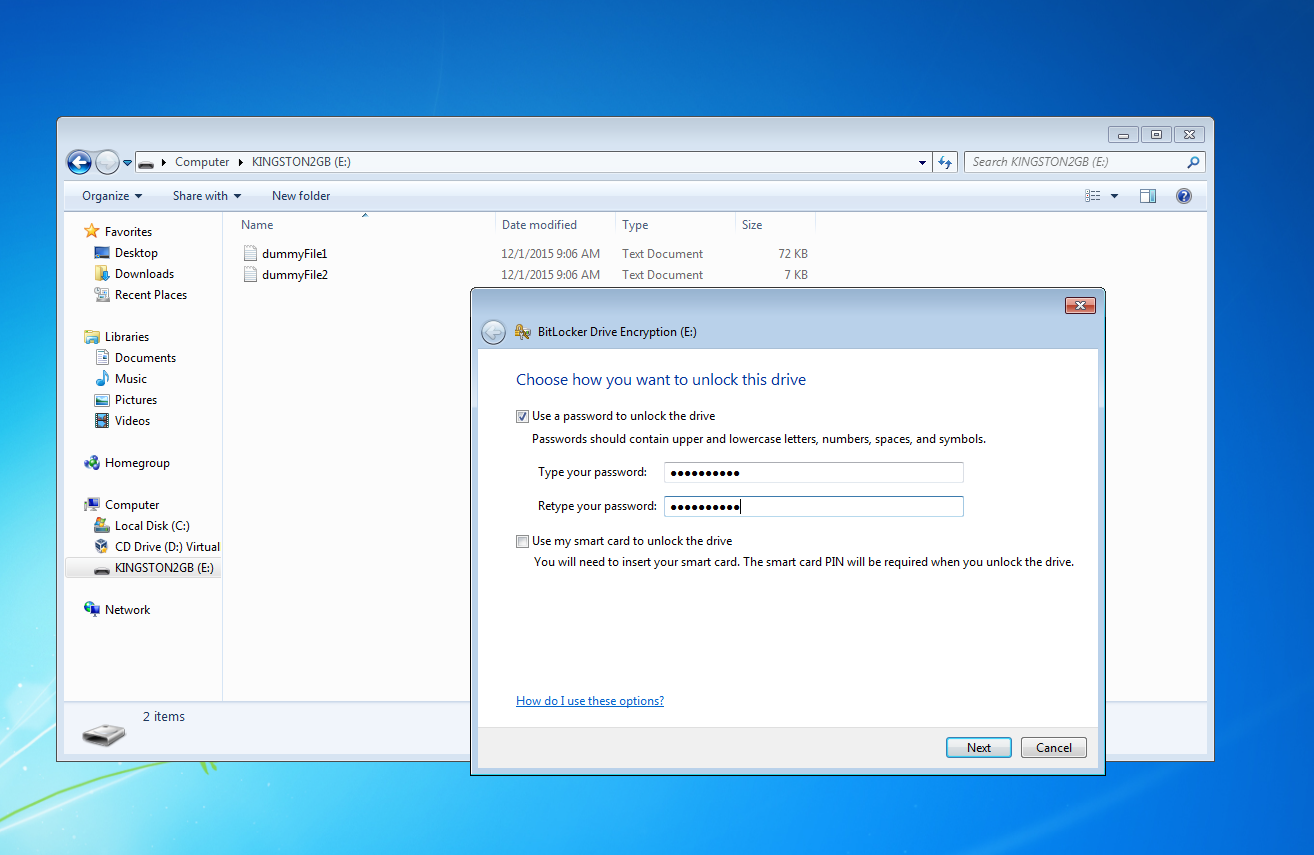
To find the password used during the encryption with BitCracker, you need to specify the -u option (see the *How To* section).
## Recovery Password Attack
During the encryption of a memory device, (regardless the authentication method) BitLocker asks the user to store somewhere a Recovery Password that can be used to restore the access to the encrypted memory unit in the event that she/he can't unlock the drive normally.
Thus the Recovery Password is a kind of *passe-partout* for all the authentication methods and it consists of a 48-digit key like this:
> 236808-089419-192665-495704-618299-073414-538373-542366
To find the correct Recovery Password with BitCracker, you need to specify the -r option (see *How To* section).
See [Microsoft docs](https://docs.microsoft.com/en-us/windows/device-security/bitlocker/bitlocker-recovery-guide-plan) for further details.
## Requirements
Minimum requirements for CUDA implementation:
- CUDA 7.5
- [NVIDIA GPU](https://en.wikipedia.org/wiki/List_of_Nvidia_graphics_processing_units) with CC 3.5 or later
As shown in the *Performance* section, both CUDA and OpenCL implementations have been tested on several NVIDIA GPUs with *Kepler*, *Maxwell* and *Pascal* architectures. In addition, the OpenCL code has been tested on an AMD GPU and a 2.9 GHz Intel Core i7 CPU (quad-core).
Minimum memory requirement is 260 Mb; it may increase depending on the number of passwords processed by each kernel.
## How To
Use the *build.sh* script to build 3 executables:
- bitcracker_hash
- bitcracker_cuda
- bitcracker_opencl
The script stores the executables in the *build* local directory.
You need to configure the src_CUDA/Makefile and src_OpenCL/Makefile according to your CUDA/GPU/Platform type or version.
To compile the bitcracker_cuda, please use the following correspondence table:
| GPU Architecture | Suggested CUDA | NVCC Gencode |
| ---------------- | -------------- | -------------------------- |
| Kepler | CUDA 7.5 | arch=compute_35,code=sm_35 |
| Maxwell | CUDA 8.0 | arch=compute_52,code=sm_52 |
| Pascal | CUDA 9.0 | arch=compute_60,code=sm_60 |
| Volta | CUDA 9.0 | arch=compute_70,code=sm_70 |
#### Step 1: Extract the image
You need to extract the image of your memory device encrypted with BitLocker.
For example, you can use the *dd* command:
```
sudo dd if=/dev/disk2 of=/path/to/imageEncrypted conv=noerror,sync
4030464+0 records in
4030464+0 records out
2063597568 bytes transferred in 292.749849 secs (7049013 bytes/sec)
```
#### Step 2: Extract the hash
*bitcracker_hash* verifies if the input memory unit satisfies some requirements. It returns two output files:
* hash_user_pass.txt : the hash you need to start the User Password attack mode
* hash_recv_pass.txt : the hash you need to start the Recovery Password attack mode
```
/build/bitcracker_hash -o test_hash -i ./Images/imgWin7
---------> BitCracker Hash Extractor <---------
Opening file ./Images/imgWin7
....
Signature found at 0x02208000
Version: 2 (Windows 7 or later)
VMK entry found at 0x022080bc
VMK encrypted with user password found!
VMK encrypted with AES-CCM
VMK entry found at 0x0220819c
VMK encrypted with Recovery key found!
VMK encrypted with AES-CCM
User Password hash:
$bitlocker$0$16$89a5bad722db4a729d3c7b9ee8e76a29$1048576$12$304a4ac192a2cf0103000000$60$24de9a6128e8f8ffb97ac72d21de40f63dbc44acf101e68ac0f7e52ecb1be4a8ee30ca1e69fbe98400707ba3977d5f09b14e388c885f312edc5c85c2
Recovery Key hash:
$bitlocker$2$16$8b7be4f7802275ffbdad3766c7f7fa4a$1048576$12$304a4ac192a2cf0106000000$60$6e72f6ef6ba688e72211b8cf8cc722affd308882965dc195f85614846f5eb7d9037d4d63bcc1d6e904f0030cf2e3a95b3e1067447b089b7467f86688
Output file for user password attack: "hash_user_pass.txt"
Output file for recovery password attack: "hash_recv_pass.txt"
```
Notes:
- While the *hash_recv_pass.txt* should be always created, the *hash_user_pass.txt* is created only if the input device has been encrypted with the User Password authentication method.
- **BDE encrypted volumes could have different structure for different authentication methods. If *bitcracker_hash* is not able to find the Recovery Password on your encrypted image, please open an issue or contact me**
#### Step 3: Start the attack
Now you can start the BitCracker attack; use the *-h* to see all the options. Here there is an attack example using the User Password method.
```
./build/bitcracker_cuda -f ./test_hash/hash_user_pass.txt -d ./Dictionary/user_passwords.txt -t 1 -b 1 -g 0 -u
====================================
Selected device: GPU Tesla K80 (ID: 0)
====================================
....
Reading hash file "./test_hash/hash_user_pass.txt"
$bitlocker$0$16$0a8b9d0655d3900e9f67280adc27b5d7$1048576$12$b0599ad6c6a1cf0103000000$60$c16658f54140b3d90be6de9e03b1fe90033a2c7df7127bcd16cb013cf778c12072142c484c9c291a496fc0ebd8c21c33b595a9c1587acfc6d8bb9663
====================================
Attack
====================================
Type of attack: User Password
CUDA Threads: 1024
CUDA Blocks: 1
Psw per thread: 1
Max Psw per kernel: 1024
Dictionary: ./Dictionary/user_passwords.txt
Strict Check (-s): No
MAC Comparison (-m): No
CUDA Kernel execution:
Stream 0
Effective number psw: 12
Passwords Range:
abcdefshhf
.....
blablalbalbalbla12
Time: 28.651947 sec
Passwords x second: 0.42 pw/sec
================================================
....
Password found: paperino
================================================
```
## Limitations
The Recovery Password attack has been tested only with devices encrypted using the User Password; **if you test this attack mode with devices encrypted using a Smart Card or TPM, please give us your feedback!**
BitCracker doesn't provide any mask attack, cache mechanism or smart dictionary creation; therefore you need to create your own input dictionary.
Currently, the User Password attack allows input passwords with a length between 8 and 27 characters.
## False Positives
By default, BitCracker runs a fast attack (both User and Recovery password) and it can return some false positive. To avoid false positives you can use 2 options:
* -s : enables an additional check (no time consuming). This option could return some false negative
* -m : enables the MAC verification. With this option there aren't false positives or negatives but performance decreases a lot; use this options only in case of an input wordlist composed by false positives.
## Examples
In the the *run_test.sh* script there are several examples of attack using the images and dictionaries of this repo:
* imgWin7: BitLocker on Windows 7 Enteprise edition OS
* imgWin8: BitLocker on Windows 8 Enteprise edition OS
* imgWin10Compat.vhd: BitLocker (compatible mode) on Windows 10 Pro edition OS
* imgWin10NotCompat.vhd: BitLocker (not compatible mode) on Windows 10 Pro edition OS
## Performance
Here we report the best BitCracker performance in case of fast attack (default) to the User Password (-u option).
| GPU Acronim | GPU | Arch | CC | # SM | Clock | CUDA |
| ------------ | --------------- | ------- | --- | ---- | ------ | ---- |
| GFT | GeForce Titan | Kepler | 3.5 | 14 | 835 | 7.0 |
| GTK80 | Tesla K80 | Kepler | 3.5 | 13 | 875 | 7.5 |
| GFTX | GeForce Titan X | Maxwell | 5.2 | 24 | 1001 | 7.5 |
| GTP100 | Telsa P100 | Pascal | 6.1 | 56 | 1328 | 8.0 |
| AMDM | Radeon Malta | - | - | - | - | - |
Performance:
| Version | GPU | -t | -b | Passwords x kernel | Passwords/sec | Hash/sec |
| -------- | ------ | --- | -- | ------------------ | ------------- | ---------- |
| CUDA | GFT | 8 | 13 | 106.496 | 303 | 635 MH/s |
| CUDA | GTK80 | 8 | 14 | 114.688 | 370 | 775 MH/s |
| CUDA | GFTX | 8 | 24 | 106.608 | 933 | 1.957 MH/s |
| CUDA | GTP100 | 1 | 56 | 57.344 | 1.418 | 2.973 MH/s |
| OpenCL | AMDM | 32 | 64 | 524.288 | 241 | 505 MH/s |
| OpenCL | GFTX | 8 | 24 | 196.608 | 884 | 1.853 MH/s |
N.B. Each password requires about 2.097.152 SHA-256
## John The Ripper
We released BitCracker as the [OpenCL-BitLocker](http://openwall.info/wiki/john/OpenCL-BitLocker) format in [John The Ripper](https://github.com/magnumripper/JohnTheRipper).
The hash generated with *bitcracker_hash* (see *How To* section) are fully compatible with the John format.
## Changelog
#### Next Release
* Provide a dictionary with all the possible Recovery Passwords (they are not randomly generated!)
* In case of User Password attack mode, increase the maximum size allowed for an input password (currently the maximum is 27 characters)
* Provide a multi-GPU implementation
#### 12/4/2017
* New attack mode to the Recovery Password
* The Recovery Password attack supports the MAC verification
* General performance improved
* New images of encrypted memory units provided (Images directory)
* New dictionary of recovery passwords provided (Dictionary directory)
* Hash Extractor now produces two different files in output
## References, credits and contacts
Plase share and test our project: we need your feedback!
Special thanks go to the John The Ripper team and [Dislocker](https://github.com/Aorimn/dislocker) and [LibBDE](https://github.com/libyal/libbde) projects.
This is a research project in collaboration with the National Research Council of Italy released under GPLv2 license.
Copyright (C) 2013-2017 Elena Ago (elena dot ago at gmail dot com) and Massimo Bernaschi (massimo dot bernaschi at gmail dot com)
We will provide some additional info about BitCracker's attack in a future paper.
Although we use the GPLv2 licence, we are open to collaborations.
For any additional info, collaborations or bug report please contact us or open an issue